the b-side
The full track listing
The front page follows one job all the way through, which is the argument. This is the list — all 266 of it, grouped by the six things a practice spends its week doing. Six sides, six faces: roll for one if you are only browsing.
every picture below is the real thing,
photographed — not drawn, not mocked up.
Want two of them explained properly instead? Timesheets and fee reconciliation, step by step.
or just pick one, if you know what you came for
side one
The jobs
A project is a job for a client, and everything else in here hangs off one. Numbering, stages, fees, who is on it, and what it is actually worth today.
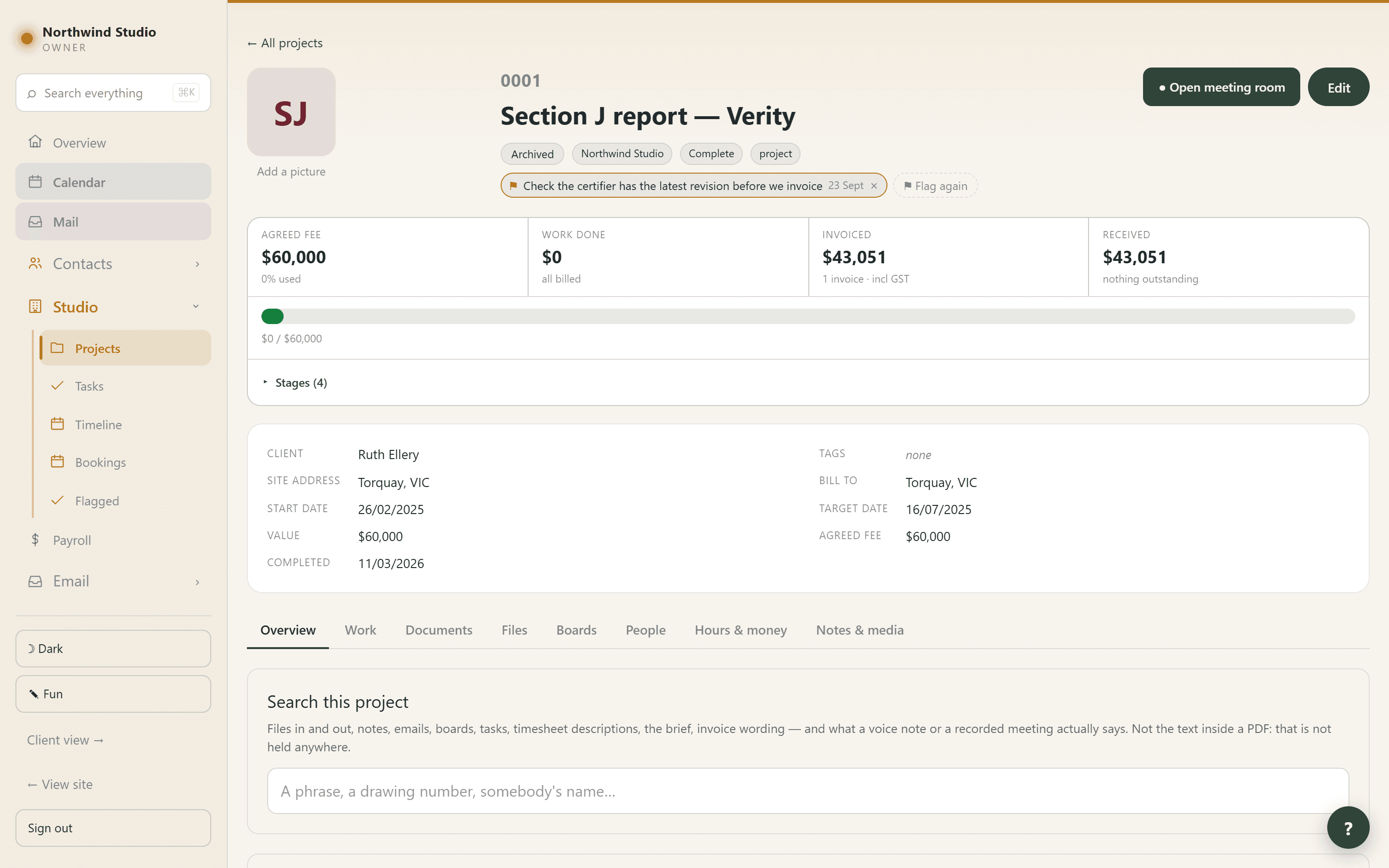
The job itself
Your job numbers, not ours
0042, 2026-0017, or whatever your filing has looked like for fifteen years. The numbering is a pattern you set, and it keeps counting from where you are.
Seven tabs, one job
Overview and the record, Work, Documents, Files, Boards, People, Hours & money, Notes & media. Everything about a job is on the job.
Rows that fill themselves in and say so
No start date? It shows the day the first hour was logged. No value? The client’s budget from the brief, marked as such. Never presented as though somebody typed it.
The client is who is linked, not a name typed on the job
The old text field could say “no client” about a job with three of them on it, because linking happens somewhere else and always did.
Search one project
Files in and out, notes, filed emails, boards, tasks, the brief — and timesheet descriptions, which on an old job is the richest seam there is.
It searches what was said out loud
Voice notes and meeting recordings are transcribed, so a decision nobody wrote down is findable. Results say where each match was and show the words around it.
Needs attention, kept apart from trivia
Overdue tasks, unpaid invoices and fixable gaps each link straight to the tab that fixes them. Underneath, tiles say only where the job is up to.
Flag anything, with a reason
A project, a task, an expense, an invoice, a person or a file. Flags are shared, anyone can clear one, and clearing keeps both notes.
Consultants on a job
The engineer, surveyor, certifier or drafter, with a free-text role because practices differ. They can be assigned tasks and they travel into the archive bundle.
Mark a consultant finished rather than removing them
A certifier who signed off a stage does not stop having signed it off.
Project templates
The half-dozen errands every job of a kind begins with. Applied to a job rather than stamped on it, and swappable for another while nobody has touched them.
Milestones and a programme
Clients can suggest dates from their own portal; you accept or decline. Every job’s milestones and task dates sit together on one timeline.
Projects that never became work
Jobs given a number that never turned into work, found and corrected — so the average fee and the conversion rate stop being wrong. Anything ever invoiced is never offered.
Archive, don’t delete
Delete is owner-only and refused outright on a job holding invoices, hours, expenses, files or a record — and it says which.
An archive bundle you could rebuild from
Every file plus a project.json complete enough to bring the job back: clients, consultants, stages, the dated record, revisions, what was issued to whom, tasks, invoices and hours.
A picture on the job, a photograph on the person
And initials where there is none — a contact without a photograph is finished, not unfinished.
What a job is worth
Stages carry their own fee
Hours are logged against a stage and invoices are raised against stages, so you can see what a stage was worth and what it cost.
A fee quoted as a range stays a range
“Somewhere between eight and twelve” is drawn as a band with a dot on what has actually accrued, saying in range, under or over — rather than being reduced to one number.
The money strip
Fee, work done at charge-out, invoiced, received, and credit held, across the top of every job, with the fee bar underneath and the stages one click down.
Where this job stands
Owed to us, and owed by us in work — shown separately and never added together, because one is money coming and the other is work still to do.
The agreed fee comes from the signed offer
Accepting a Letter of Offer writes its total onto the job. It used to be a field somebody could fill in, and it was set on 0 of 340 jobs.
A later signed offer replaces it
And what it replaced is written into the project’s record, so the change is visible rather than silent. A nil total never wipes a fee.
Retainers
An amount per period, running from the start date rather than the calendar month. The hours are evidence, not the bill.
Unused retainer fee carries forward
A quiet month builds credit that a busy one draws down, so one heavy period is not a story. Several in a row with the credit gone is the argument for an increase.
Two retainers cannot overlap
Raising the fee means ending one and starting another; the old one keeps its history, because that history is what justified the increase.
Out-of-scope work stays billable
A stage whose code ends in X sits outside the agreed scope, so it does not count against a retainer.
Charge before the work: hour credits
A kick-off fee or a lump sum buys hours at a rate, and the invoice PDF explains what the money bought — how many hours, at what rate, and that they are not charged twice.
Or credit back what was over-billed
An adjustment where you type the hours, or a flat dollar amount for goodwill — each priced and worded in its own unit, because a $500 credit reporting “four hours remaining” is how somebody draws the wrong figure.
A draw can never be priced wrong
The hours are the only thing you type. The rate, the GST treatment and the wording all come from the credit invoice itself.
Disbursements
An expense tagged to a job is on-charged on that job’s invoice, and counts as recovered once it is attached to one — the same flag that stops it going out twice.
Boards
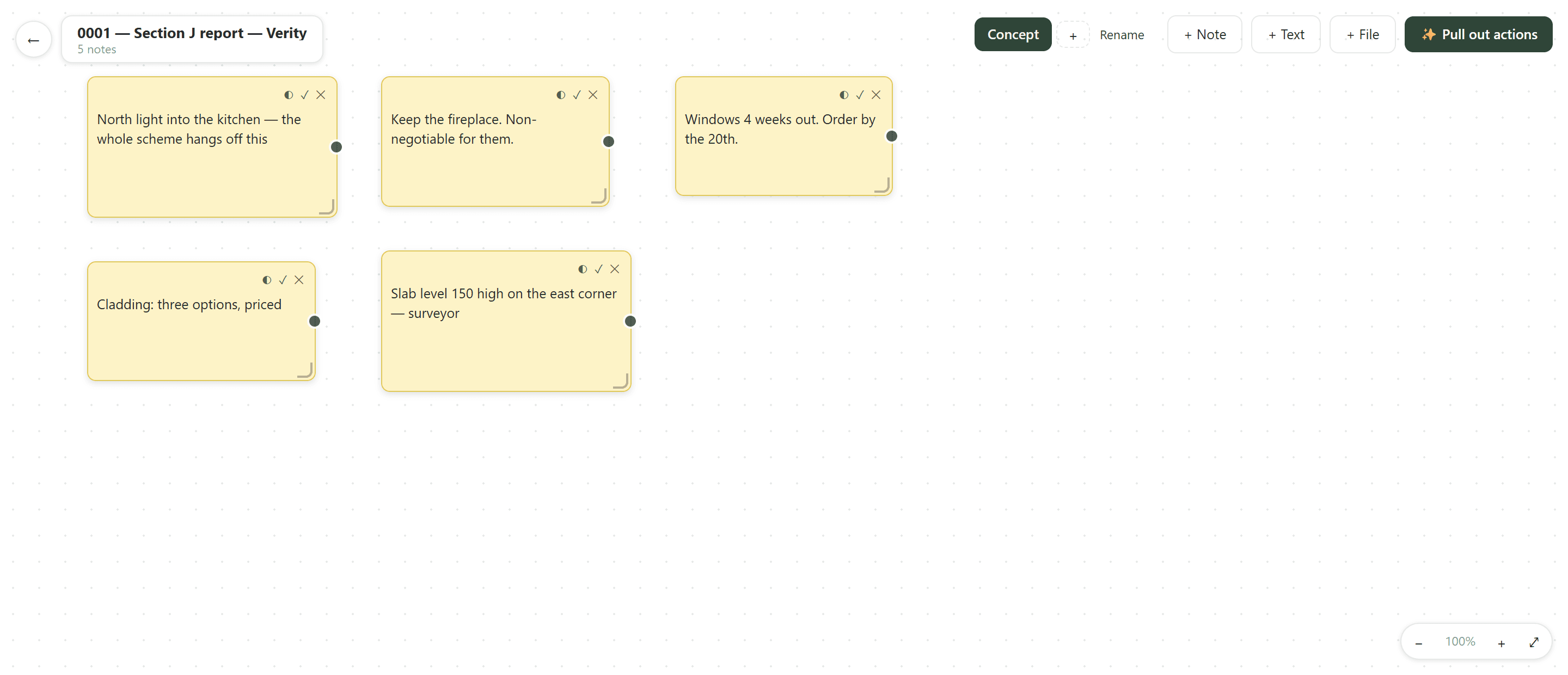
Sticky notes, images and connectors on a canvas
Several boards per job, so the concept sketch, the consultant coordination and the defects list do not fight for one surface.
Any file dragged on is filed in the job at the same moment
A document that exists only on a board is a document nobody can find later.
Drop a PDF and mark it up
A plan is rendered page by page into images you can annotate. The PDF itself is filed too, so a marked-up sheet traces back to the document it came from.
Pull out actions
Board notes become real tasks on the job rather than staying as things written on a wall.
side two
The paper trail
Drawings go out, drawings come back, and six months later somebody says they never got Revision C. This is the half of the software that answers that.
The files
Revisions as you actually write them
A/B/C, 01/02, P1 — free text on purpose, because every office does it differently and none of them is wrong.
Latest means latest in a stage
Moving a file to another stage clears its star rather than leaving two in the destination. Mark it again there if that is what it is.
Rename, re-revision and re-stage in place
A file filed under the wrong stage is moved with the small box on its row. No re-uploading.
A file carries its consultant
Whose it is, or who it was sent to — deliberately not the same as who uploaded it. For a drawing the engineer sent, those are the same person; for one we sent them, they are not.
An off switch that says what it is holding back
“4 files hidden” rather than a job that reads, from the client’s side, exactly like a job with nothing on it.
Links to where the working set really lives
Drive, Dropbox, SharePoint, a NAS, the builder’s folder — as many as the job has, each staff-only or client-visible, because a folder link is a shared credential.
The received register
What arrived, from whom, and when it arrived — not when somebody got round to filing it. Up to 25 MB a file, straight to storage, with its own register PDF.
Project files are genuinely private
Stored where nothing reads them without a credential; opening one issues a link that works for a few minutes and then stops. A receipt copied out of the address bar is a dead link.
Issuing them
The transmittal
Tick the files, press Issue these files, name the recipients, send. People already on the job are one tap each; anybody else is typed in.
Every recipient gets their own link
Which is what lets the register say the builder opened it on Tuesday and the certifier never did — and lets one person be cut off without withdrawing from everybody.
Recipients need no account
The link opens a plain page listing the files with a download button each, and it keeps working — a set of drawings is something somebody needs again next week from the same email.
A link proves who is holding it
Opening one emails a six-digit code to the address it was SENT to, never to whoever has the link. A forwarded link does not work, and the real recipient gets a code they did not ask for.
Withdrawing emails everybody still holding one
With your reason. “Superseded by Revision D” is the difference between a dead link that reads as a fault and one that reads as a message.
A withdrawn issue is never removed
It stays on the register marked withdrawn, with the date and the reason — because “how long was the old set in circulation” is the question that follows “we built from Revision C”.
Download the register as a document
Every issue, file, revision and recipient, with sent, opened and downloaded dates, and the ones never opened in red. That is the thing to hand over.
The issued register is a record, not a view
Names and revisions as they were at the moment of issue. A file deleted since still shows on the issue it went out on, marked “deleted since”.
Links go out on the brand’s own domain
A builder sent drawings for a Building Physics job is not handed a fiveelementgroup.com address.
And the email comes from the name that owns the job
Its name, its logo, its website in the footer, replies to its address — covering the transmittal, its code and its withdrawal notice.
The document register
Built, never kept
Assembled from the files and the transmittals, so it cannot disagree with either.
One row per document, not per issue
“Has the engineer got Rev C” is the question; a row per issue would bury the current state under the history of getting there.
A revision that has never been issued
A drawing sitting at Rev C whose last transmittal went out as Rev B, flagged in red at the top. That is the one nobody notices until a builder prices the wrong drawing.
Sent is not the same as opened
A document shows “not opened” where nobody has.
Issued but not held here
Anything that went out with no matching file in the portal is listed rather than quietly dropped.
side three
The conversation
Email, meetings, recordings and notes — the part of a job that is talk, filed where the job is rather than in somebody’s inbox.
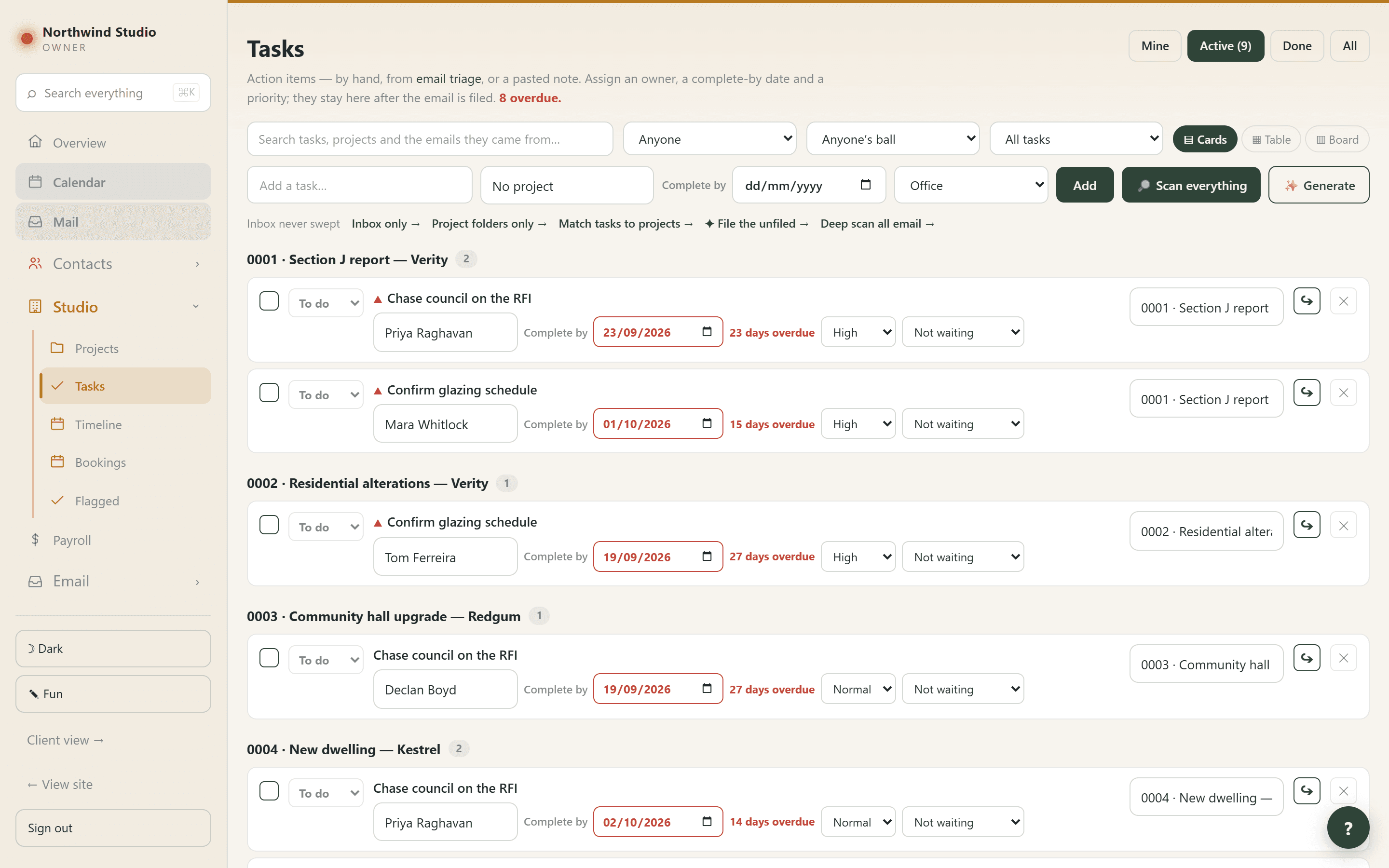
Your mail, filed onto the job
Every mailbox as one inbox
Each message showing the person and the project it belongs to. You can reply, and each mailbox has its own from-address and signature.
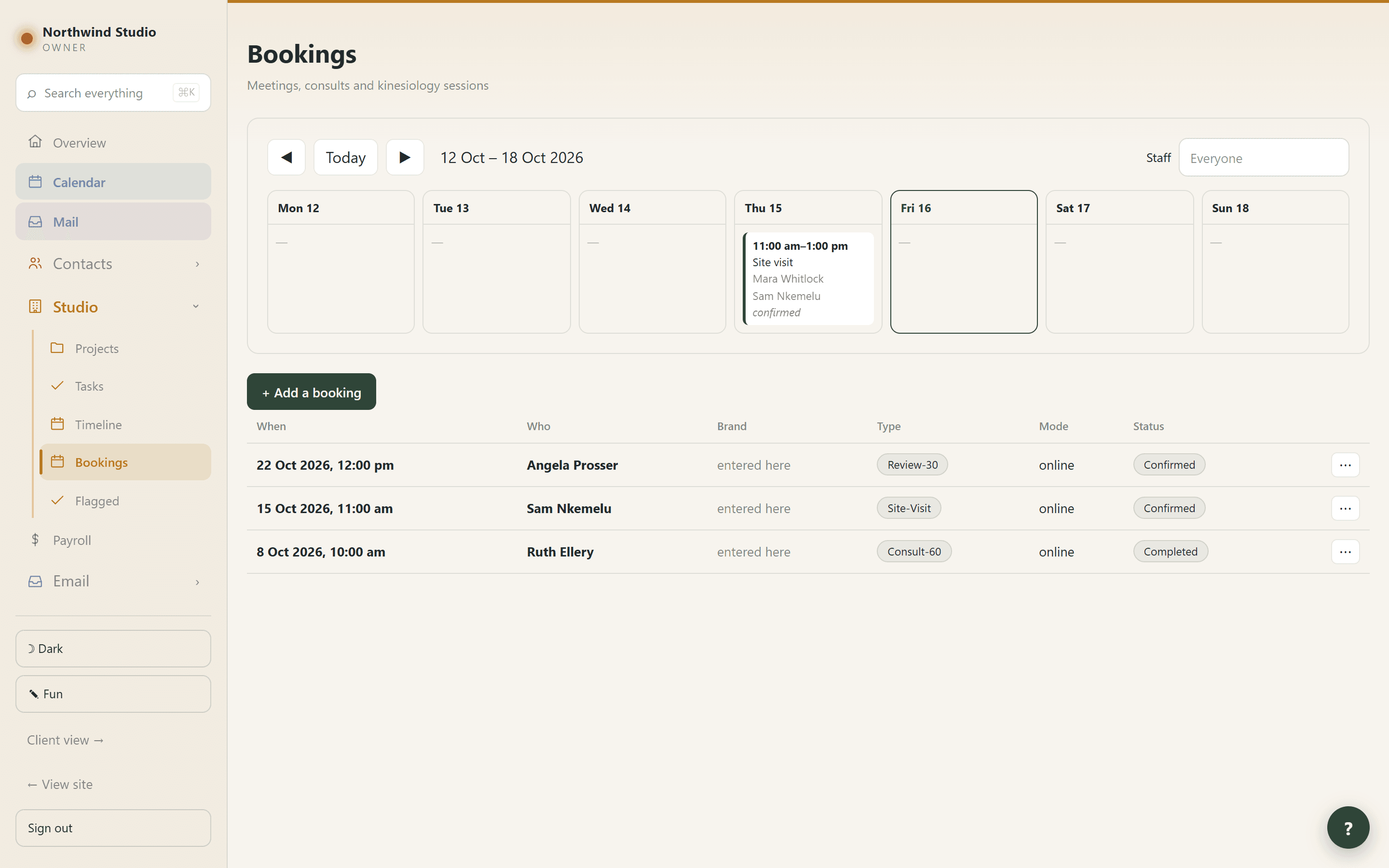
Triage it to a project, the office, personal or the bin
With suggestions from the sender, the recipient and the subject.
Filing copies what the email SAID onto the record
Dated when it was sent, with the subject and sender, in the job’s ledger beside the tasks and invoices — so “what did we agree in March” is answerable without a mail client.
The quoted thread is cut off first
A reply-all chain repeats the whole conversation in every message, and six copies would make the record unreadable. Where something was cut, the entry says so.
Attachments become inbound files
Each one still tied to the message it arrived on. Filing the same message twice cannot produce two copies of the same drawing.
Filed to the wrong job? Move it, or copy it
One message can honestly belong to two jobs. What it SAID is never editable — only which job it belongs to, because that is the part somebody decides in a hurry.
✦ Enquiry
Says this message is somebody asking about work. It raises a lead carrying their name, address and their own words, dated when they wrote.
A suggestion you have not looked at says so
Rows read “suggested · check” until you touch them, and filing tells you how many are unchecked before it starts — because that is where filing goes wrong quietly.
Triage refuses rather than half-filing
Tick a destination that is not set up and it stops before touching a single message. It used to drop that destination and report success, so mail left the inbox and went nowhere.
Your own address never picks a project
Everybody here is on mail for every job, so their presence cannot tell one job from another. A client’s address still picks their job.
The filing rules are yours to edit
What the detector follows is a written skill in Settings, changed when a real inbox disagrees with it. No deploy.
Export a whole mailbox folder
It and its subfolders in one pass, as a ZIP or straight to disk.
Routines, and when each last ran
Inbox sweep, filing, mailbox read, calendar sync, contacts sync — one line when all is well, opening itself when it is not. Late means three times its interval, not one.
Meetings
A permanent room for every job, every person and the practice
With a link that never changes, so it can go in a brief or an email signature and still work next year.
Send somebody their own link and they walk straight in
It names them: no account, no sign-in, no name to type, nobody waiting to be noticed. It stops working when they come off the job, without anybody remembering to turn it off.
A waiting room, which is what makes the plain link safe
Staff walk in. A signed-in client on that job walks in. Everybody else gives a name and knocks, and is told nothing but the room’s name until you let them in.
Video by default, audio-only in one click
And the camera and microphone each have their own button.
Blur the room behind you, or put a picture there
Picked before you join so you can see what you look like, and applied to what is sent rather than only to your own preview.
Shown whole, never cropped, never mirrored
The edge of a drawing is usually the part being pointed at. Somebody who joins mid-share sees it immediately.
Pop the call out and keep using the portal
It floats in its own small window on top while you open the project board, look up a fee, check an invoice. The same call — nothing reconnects and nobody sees you leave.
Recording only if everyone in the room agrees
One combined recording made by whoever asked — everybody’s picture in a single frame with their names on it, not a file per person.
Then it writes the meeting up
Transcribed, summarised into what was decided and what is still open, and the actions become real tasks. The video is kept seven days; the transcript and the actions stay.
Recordings, notes and what was said
Record a screencast over a drawing
You talking over a report, a drawing or a set of figures, with your face in the corner — a spoken review instead of a covering email.
Record again throws the take away
With no confirmation, because that is the point: nobody sends the first take of themselves talking.
Keep it and it becomes a file on the job
With its length, downloadable, and transcribed automatically so it can be searched later.
Notes & media is one shelf
Capture on a phone, the project itself, and the client’s own portal all write to the same place, and what a thing IS decides where it lands. Each entry says which put it there.
Voice notes transcribed wherever they were recorded
The text appears under the player within a minute. A recording nobody can search is a recording nobody reads twice.
Let the client add photos and notes
A separate switch from letting them SEE things, and off on every project — seeing and adding are different permissions.
A notice about one job
Shown on the job and on the Overview, tagged with its name so it is not mistaken for a practice-wide one.
Finding it again
Search everything, from anywhere
Ctrl+K on any screen. It opens over what you are doing rather than taking you off it, and closing puts you back.
It covers the things that are not documents
Projects, people, tasks, files in and out, boards, filed email, timesheet descriptions, and what voice notes actually say.
It obeys permissions exactly as the pages do
Somebody without the invoicing capability gets no results from invoices, rather than being told there is something there they cannot see.
“Nothing found” means nothing found
Each source is searched independently, so one failing costs only its own group and the box says which. A fault used to read as a portal with no record of the person.
And it says what it cannot reach
The words inside a PDF are not held as text anywhere, so a clause mentioned only inside a certificate will not come back. Said rather than left to be discovered.
side four
The week
Hours typed once, on the day they happened, with enough on each one to answer a question about it three years later.
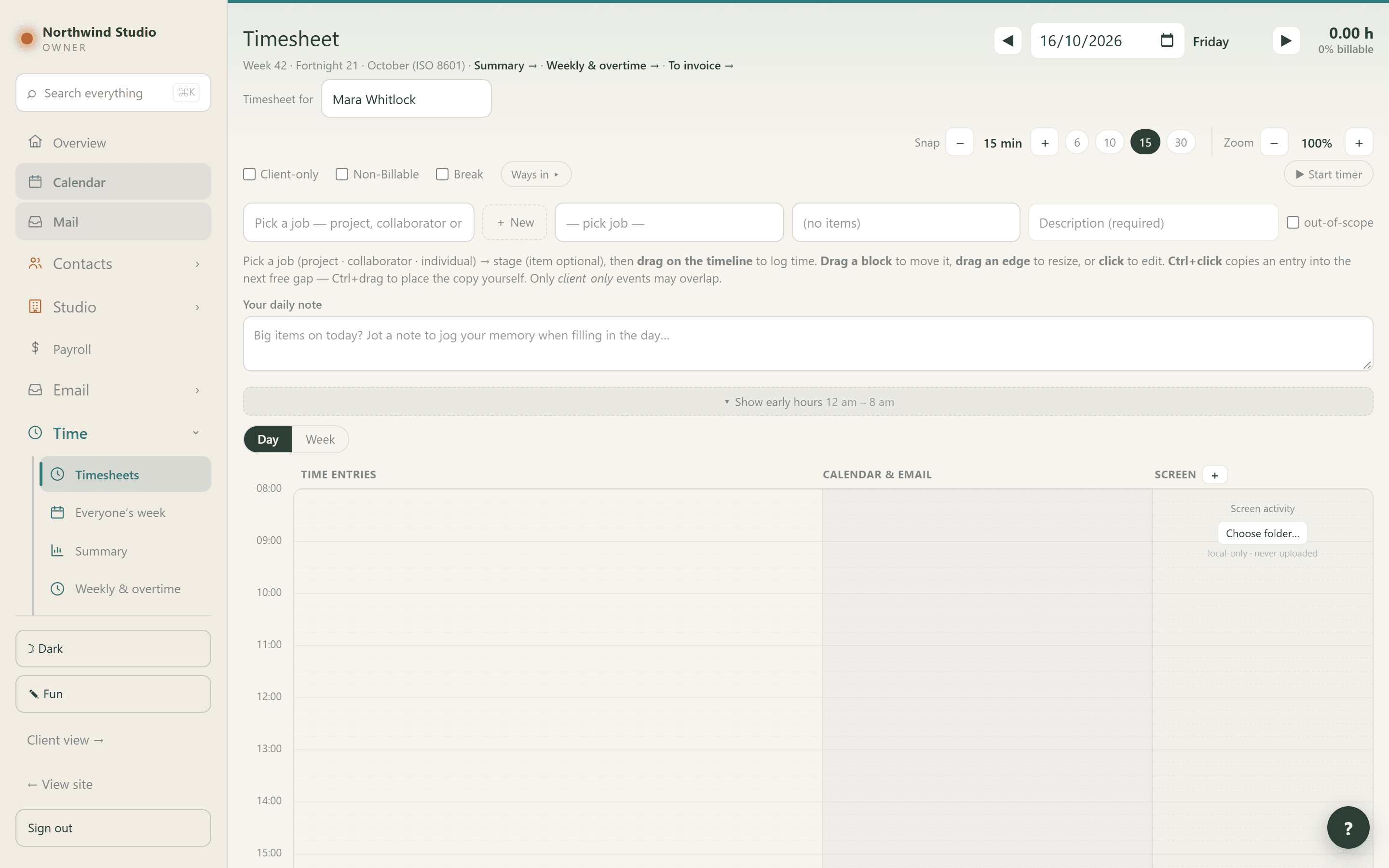
Getting the hours in
Four references on every entry
The job, the stage within it, what kind of work it was, and what you actually did — which is the line that turns up on a client’s statement years later.
Click empty time
The form opens already knowing WHEN, which is the one field nobody wants to type. Say what it is, pick the job and stage, choose the length.
Or fill the bar and drag it out
The original way and still the fastest once you know it.
Or run a timer
It survives a reload and a trip to another page, because it remembers the instant you started rather than counting in the tab. Stopping opens the form with the start and length filled in.
Ctrl+drag to copy a block
Same job, stage, type and description, dropped in the next gap that fits — the quickest way to log a day that is the same handful of jobs over and over.
A copy keeps its length
It will skip a short gap and take a later one rather than come back shorter. Hours are money, and a copy that quietly halved itself would look exactly like one that worked.
Drag sideways to move it to another day
The same gesture that copies with Ctrl held.
Breaks and office time ask for a type, not a job
Because they are not on one, which is the point of them. Lunch used to have to be logged some other way, leaving an unexplained hole in the middle of the day.
Your own working days, your own zoom
The week starts from the days on your profile, the toggles decide after that, and the zoom is shared with Everyone’s week so 100% means the same size of hour on both.
The day beside your calendar, your email and your screen activity
Three columns for reconstructing one day, kept to the Day view — one of each beside five days is fifteen lanes of reference nobody reads.
Turn off the ways in you do not use
Four ways to start an entry is three things to ignore if you only use one, on a screen you are in every day. The switch panel itself never hides.
Planning it
Planned time is drawn differently and counts for nothing
Dashed and faded, out of the day’s hours, out of the billable share, and it can never reach an invoice. A day full of intentions must not read as a day worked.
✓ I did this
Turns a plan into real work, which then flows into WIP and invoicing like any other hour. There is no button the other way, because by then it may be on an invoice.
Block time for a task against your real diary
It shows the times actually free, grouped into morning, afternoon and evening, and the times follow the length because a two-hour block fits in fewer places.
Log time from the task instead
The inverse of a timesheet: the task already knows the job, the stage, the kind of time and the description, so it asks only how long and which day.
Travel offers both legs
Because nobody drives to a site visit and stays.
Reading it back
Everyone’s week on one clock
One column per person per day, the time of day pinned to the left while the columns scroll under it. That is what makes eight people across five days usable.
Blocks painted by job
A job keeps the same colour everywhere it appears, which is what lets a week be read as bands of work rather than a wall of one colour.
Approve one at a time
A button that approved everything on screen would be one misclick from approving a week nobody read. Approving is its own permission — editing your own hours does not grant it.
What “approved” controls is what the CLIENT sees
Nothing more. The hours are counted, costed and billed either way. It is not a sign-off in the HR sense.
Un-approving holds
Taking a line back off a client’s statement survives later edits to that entry. It used to be undone by the next edit, so work came back in front of a client with nothing saying so.
You can be more cautious than the practice, never less
Holding your own work back needs nobody’s permission; putting it straight through is only offered where the practice already allows it.
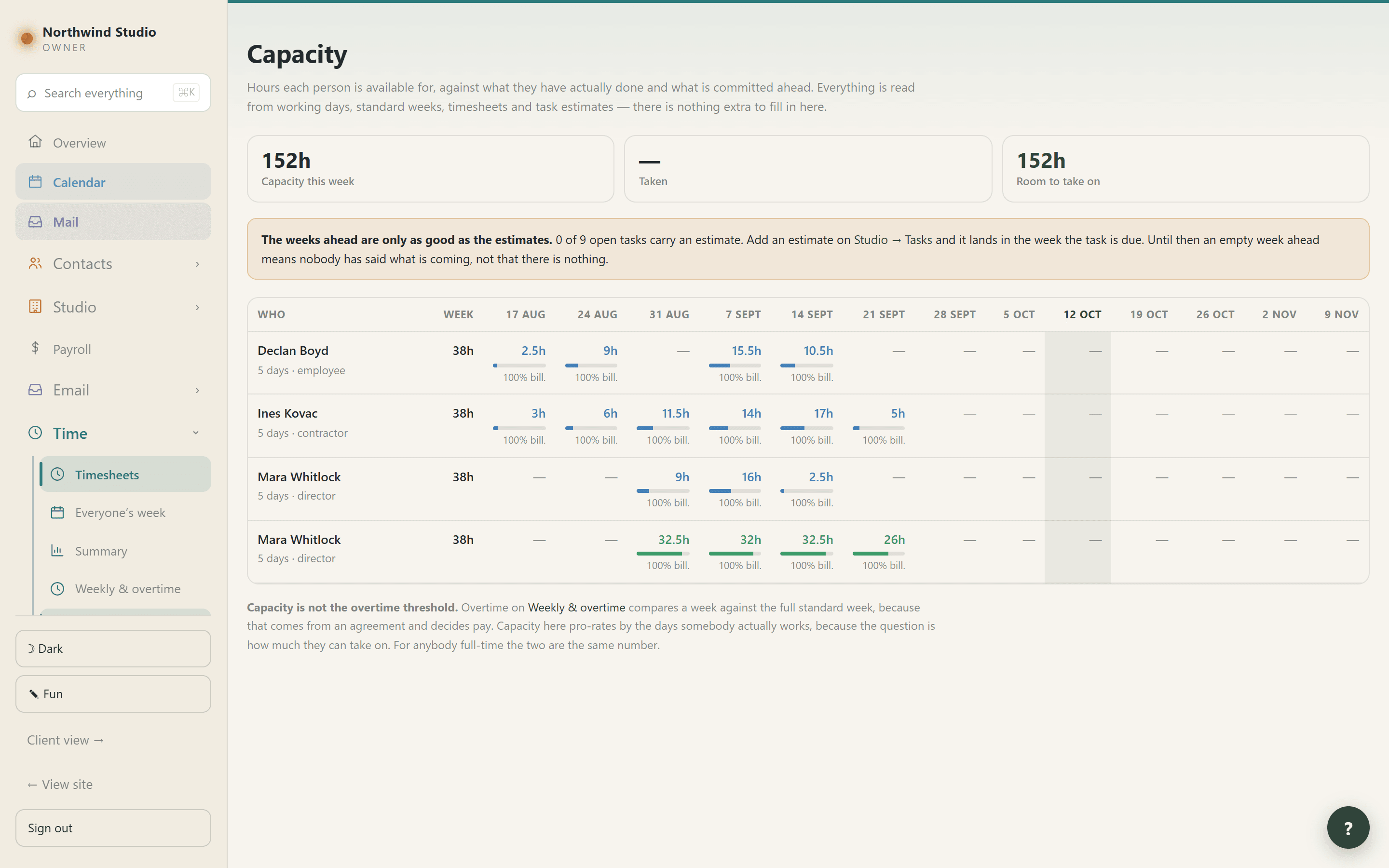
Capacity, pro-rated by the days somebody actually works
Deliberately not the overtime threshold: a 38-hour contract worked over three days is an overtime threshold of 38 and a capacity of 22.8.
Over capacity is shown, never clamped
A 76-hour week against a 38-hour capacity reads as 202%, because that is the week somebody needs to see.
Overtime is a flag on entries, not a figure on a week
Which is what lets it break down by job and what payroll reads. Auto-flag it, or type the hours.
And it tells you when the arithmetic will not fit
Entries are flagged whole, so asking for 5 hours against entries of 1.5, 2 and 2 gives 5.5 — and it says “flagged 5.50, not 5.00” rather than letting you believe otherwise.
Non-billable triage shows your own hours
Everybody categorises their own office time. It used to show the whole practice’s, so opening it to sort your ninety entries handed you thousands of somebody else’s.
Every hour in one editable list
Filterable, editable inline, and a correction there flows through the job’s work in progress and its billing split without being re-entered.
Tasks
Three kinds, and the difference is who can see them
On a job (shared), office (shared), and personal — the one place in the portal an owner cannot see something, on purpose. It holds at every door, not just on the list.
Cards, Table or Board
The same filtered list three ways: what is on my plate, how do these jobs compare, and where is everything up to.
Who the ball is with
Not waiting, needs us, or waiting on them — deliberately separate from the status, because a task can be Doing and waiting on the client at the same moment.
And how long it has been there
“5 days”, “3 weeks”. A task waiting on a council for a month is a different problem from one waiting since yesterday.
Handing a blockage over keeps the original date
A question that went to the client in March and comes back to you in October has still been open since March.
Progress, the estimate, and what it has actually taken
The pair is the useful thing. Hours are read from the timesheet and never stored on the task, so they cannot drift from what invoicing sees.
Priority graded cold to hot
Three stops, not a hundred — eight places in the portal act on low, normal and high, and a percentage beside them would be a second answer to one question.
Board columns are the project’s own
Add one, rename it, say what cards in it COUNT as — so “Waiting on certifier” marked as in progress keeps counting as open work, which is what it is.
Move a pile of tasks to a job at once
With Delete on the same bar, in red and apart from it, because only one of the two can be undone — and the confirmation names the first few rather than only counting them.
A sweep never puts anything on your list
Everything the inbox sweep finds waits in review until you press Keep. Nothing arrives behind your back.
✦ Suggest job and stage, and ✦ File the unfiled
They propose and change nothing. The job a task sits on is the job its hours land on, and that reaches a client’s invoice.
Two kinds of answer, marked differently
A grey “named” badge is a string match you can check word for word. A purple “✦ read” badge is a judgement. Treat the second with more care.
The sweep ignores the portal’s own mail
One unpaid invoice used to produce a fresh “Pay Tax Invoice 260029” every day it was chased — some of them telling you to pay yourself.
And it will not raise the same task twice
While one with the same wording is still open on the same job. A task you finished that comes up again is still raised: that is new work.
side five
The money
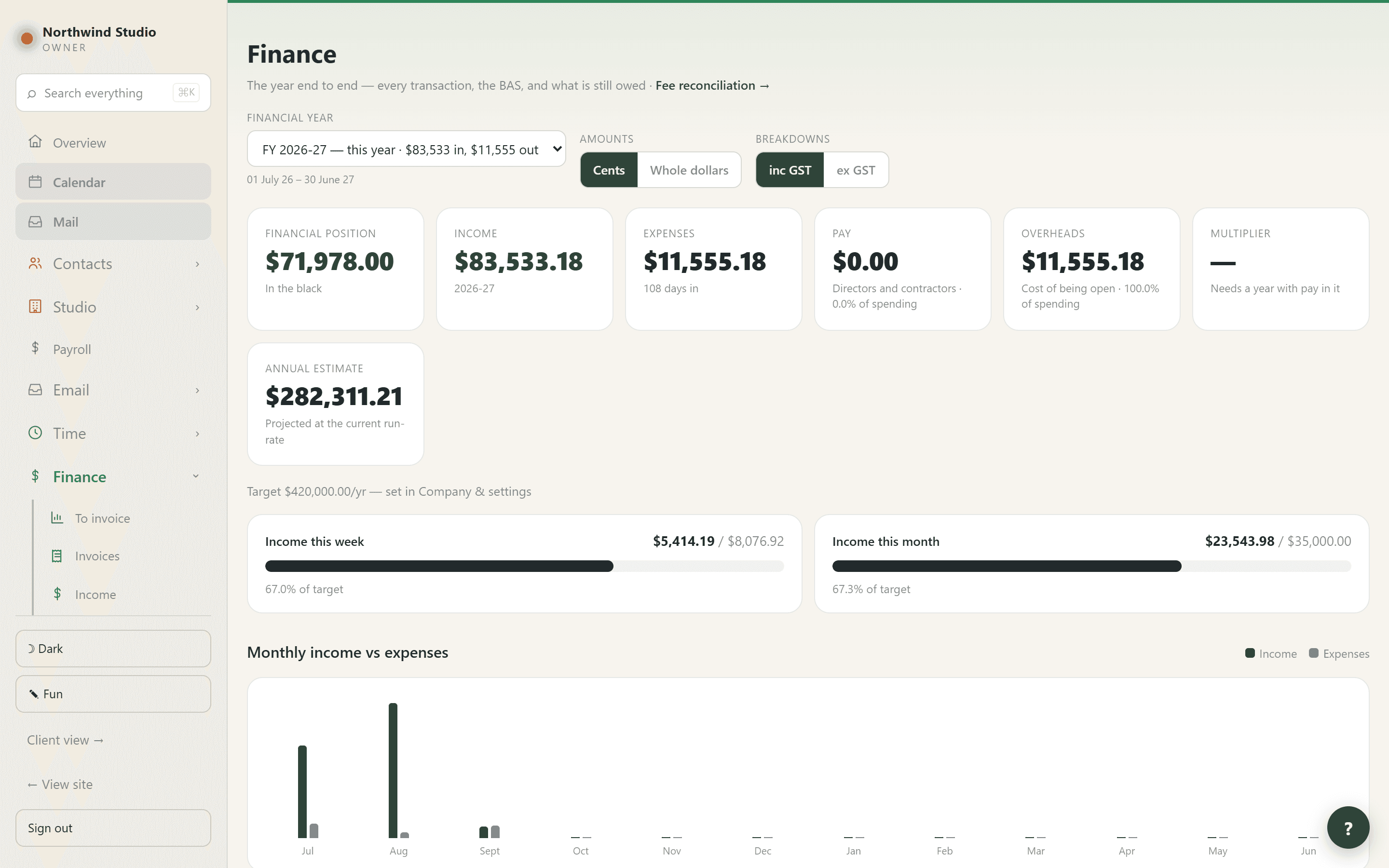
Cash-basis and GST-inclusive throughout, in the shape the BAS asks for — because that is the question you are actually going to be asked.
Invoicing
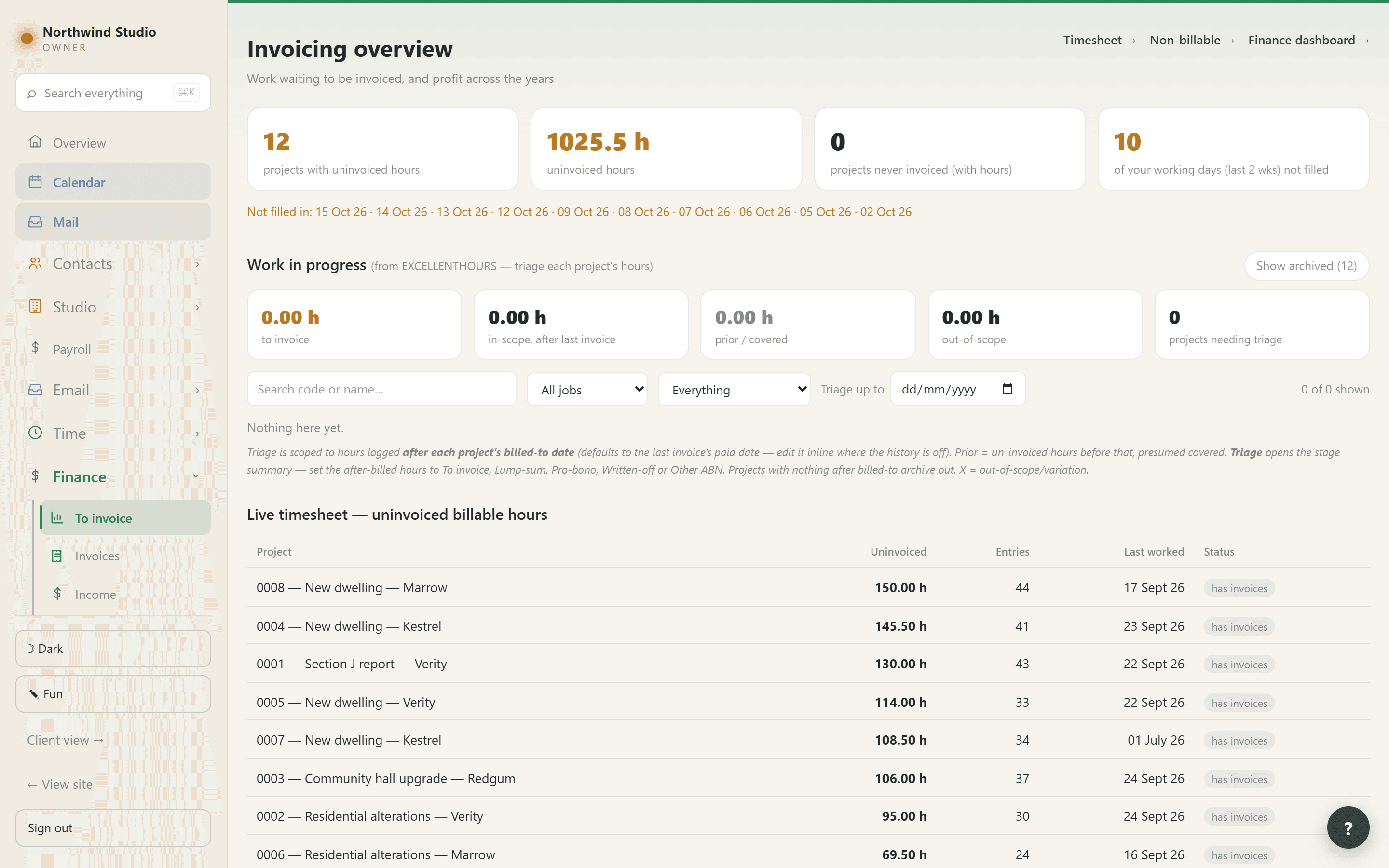
The invoice is already written
Because the hours are already there. Look at what has been done since you last billed, and say yes.
Hours are claimed the moment the draft exists
Not when it is sent — so a second invoice cannot pick up work the first is waiting to bill. Discarding the draft gives them straight back.
A stage brings its out-of-scope hours with it
Billing PH also covers PHX. They used not to be flagged, which meant work that had been charged was offered for charging again.
A plain fee invoice collects nothing
An invoice that says nothing about hours never quietly sweeps up a job’s outstanding ones.
Correct it by hand when you need to
Hours on invoice lets you tick and untick lines, with a badge showing which are on this invoice and which are on another.
By week, by job, or every entry
Twenty-nine hours can arrive as thirty-seven lines or as seven, and the short version is the one somebody reads and pays. The money never changes.
A group never mixes rates
Hours × rate equalling the line is the one piece of arithmetic a reader can check, and a blended rate would break it while looking fine.
The statement of hours goes with it
Every entry, whatever the invoice chose to summarise. It says on its face that it is not a request for payment, so two PDFs arriving together cannot be paid twice.
How it prints is set on the JOB
So what you download and email is exactly what the client can download from their own portal. A practice that sends one thing and publishes another has a problem nobody can see.
Fees are snapshots
Each line priced at the charge-out rate recorded when it was logged, so a statement reissued after a rate rise still shows what the work was charged at.
Two ways to number
Carry on from your last number, or a pattern — {YY}{SEQ:4} gives 260001 and restarts by itself when the year changes. The preview is drawn by the engine that issues the number.
Part payments, with the GST apportioned
Pay 40% of an invoice and 40% of its GST is on that BAS. The arithmetic runs on the total so the parts always add to exactly the GST charged.
The EFT block shows the balance
That is the figure a client copies into their banking app; leaving it at the original total is how somebody pays the whole invoice twice.
Chasing a part-paid invoice asks for the balance
Thanks them for what has arrived and says what is outstanding. Sending the full figure again tells a client who HAS paid that nobody noticed.
Test the reminder on yourself
The real wording, the real attachment, the real balance — sent to you, and deliberately not recorded as a chase.
Getting it in
They pay on your page
Not a payment processor’s page. Yours — your letterhead, your ABN, your bank details. The invoice marks itself paid and the money turns up as a bank line to reconcile.
Card surcharges, off by default
Two switches because they are two questions — Australian cards and overseas ones. A surcharge you have to remember to switch off is one somebody forgets.
What came in, in three lists
Invoiced, other income (interest, refunds, grants), and money in that is not accounted for — which is a set of questions, not extra income.
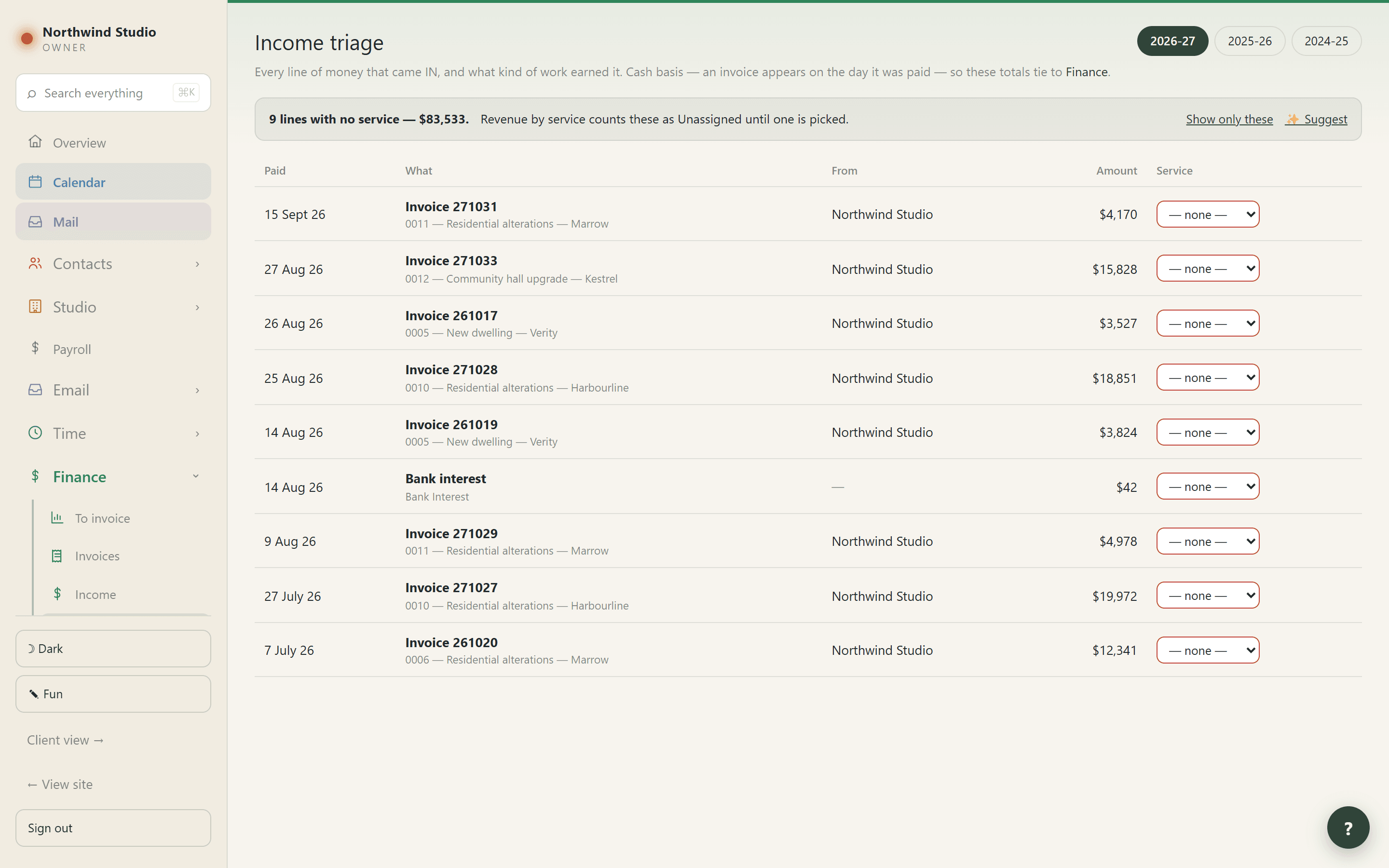
Income triage leads with the blanks
“23 lines” is a chore; “$41,000 uncategorised” is a reason.
The services are your own
Nothing is supplied — a portal shipping with somebody else’s service list is no use to anybody.
Three places a service can be set
On an invoice line, on the invoice, or on the trading name as its usual one. The report reads the most specific it finds, which is what makes this work without a tagging chore.
Split one invoice across services
Each line takes its own, and the year’s report splits that invoice by each line’s share — including the GST — so the parts always add back to the whole.
Decide a whole bank category at once
Set the service on one director contribution and apply it to all of them, in every year. A half-tagged category is worse than an untagged one: the total looks right and is not.
✨ Suggest writes nothing
Each answer appears on its row with an accept button. It can only choose from your own services, and is told to return nothing rather than guess — a wrong category is worse than a blank one.
“Not a sale” and “not income”
A grant is income and is not a sale. A BAS refund is not revenue at all. Before this existed the practice’s own figures counted about $16,000 of refunds and contributions as income.
Revenue by service, by project, by state
Shares apportioned across the rows rather than each rounded alone, so a column under a total that says 100% actually comes to it.
Any twelve months, not just a financial year
An insurer’s policy period does not start on 1 July, and answering from financial years meant adding two together and estimating the overlap.
What it costs
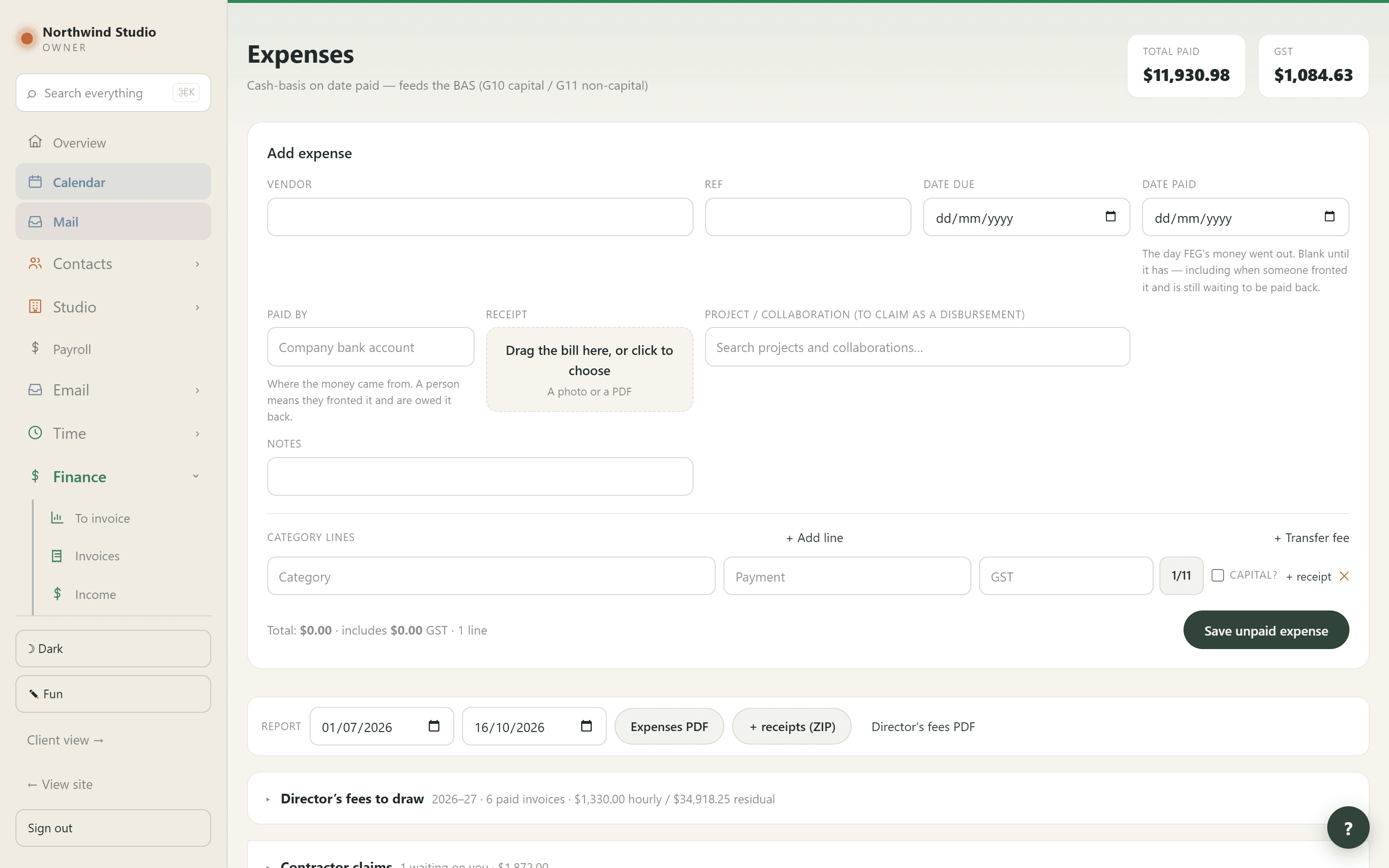
Dated when the money actually went out
Left blank until then — including when somebody fronted it personally and is still waiting to be paid back.
One payment, or a bill split across lines
Use the second when a single payment covers more than one thing.
Pay runs
Several expenses leaving the account as one transfer: tick them, name the run so you can find it on the statement, say who it pays, and stamp the date when the money goes.
A paid run freezes its total
From then on it is the record of money that has already left the bank, and nothing done to its expenses afterwards changes how much went out.
And it says when it stops adding up
“$22.95 unaccounted” — that much was transferred that the run can no longer show you a receipt for. It used to shrink silently and surface days later as a bank line that would not reconcile.
One run, one payee
One bank line that pays two people cannot be reconciled to either.
The person paid gets a statement
Emailed when the run is settled, with a PDF of what it covered.
Reports that come with their evidence
An expenses PDF, the same plus every receipt as a ZIP, a director’s fees PDF, and a PDF per pay run — each receipt named after the line it belongs to.
Find it in any year
By reference, vendor, category, note — or by amount, so “2244” finds a payment you can remember the size of but not the name of.
The bank, the BAS and the year
Import the statement
Drag the CSV in; the columns are mapped on screen. Nothing already in the portal is removed.
Match it
A credit to an invoice, a debit to an expense, or Match pay run when one line covered several — which lists every paid run measured against it and says how far off each is.
Stripe as its own account
The charge, the fee and the payout are three separate lines, so the fee is an expense and the payout is your own money moving rather than new income.
“It’s a transfer” is a category, not a sentence
The whole system reads it, so a line you have explained stops being asked about on every screen. It used to write only a note, which nothing could read.
Any bank line can carry a note
Which stays whether or not the line is reconciled — the lines worth annotating are usually the ones that took some working out.
Needs an answer, before you export
The credits nobody has accounted for, by quarter, answerable on the spot. It is the same list your accountant receives, not a preview, so clearing it here genuinely clears the sheet.
An answered row stays listed
Your accountant is entitled to disagree with the explanation, and a row that vanished when somebody typed into it would be a way to hide a real problem from the person paid to find it.
The BAS, quarter by quarter
With the quarter in progress called out above the table, its arithmetic shown (1A charged − 1B paid) and the standard lodgement date beside it.
Whole dollars that still add up
The four quarters are rounded together so they total the year exactly, and GST stays at one eleventh of the taxable amount.
inc GST / ex GST takes each row’s own tax off
Never a flat eleventh. Four financial years of real income here carry no GST at all, and dividing by eleven would have invented tax that was never charged.
Send one quarter to the accountant
The summary, every receipt, every invoice and a spreadsheet of the lot, in numbered folders with a READ ME — so a BAS can be checked without sending a year of paperwork.
Or the whole year, four ways
Full report, profit and loss, receipts as a ZIP, or Everything — including a proper tax invoice generated for anything that was never sent from the portal.
A progress bar that admits what it cannot know
Seconds rather than an invented percentage. It used to clear on a blind six-second timer, so a forty-second export looked finished for thirty-four of them.
Every transaction, filtered, exported as what is on screen
By month, quarter, type, category or whether GST was charged. The filters combine and the totals follow them.
Debts and liabilities
Money owed that is not an unpaid bill. None of it touches income, expenses or the BAS until it is actually paid.
Raise an expense and the debt settles itself
The moment that expense is paid, dated to the day the money moved rather than the day you remembered. Take the payment back and the debt reopens.
Settling by hand asks how
Written off, or paid — pointing at the actual payment. “Settled” on its own cannot tell a decision from an omission, and here it once hid a debt that had never been paid.
The accountant’s statements, as lodged
Beside the portal’s own cash-basis figures, so the difference can be seen and explained rather than worried about.
Books closed up to a date
Everything on or before it cannot be created, edited or deleted — checked when the record is saved, so it holds for a stale tab left open since last year.
side six
The people
Who they are to you, how each of them gets paid, and exactly what each of them can see.
Who they are
One record, several things at once
Lead, client, consultant, trade, collaborator, staff. Categories are tags and never a ladder — which is why 26 people were somehow a lead AND a client with nothing able to say which.
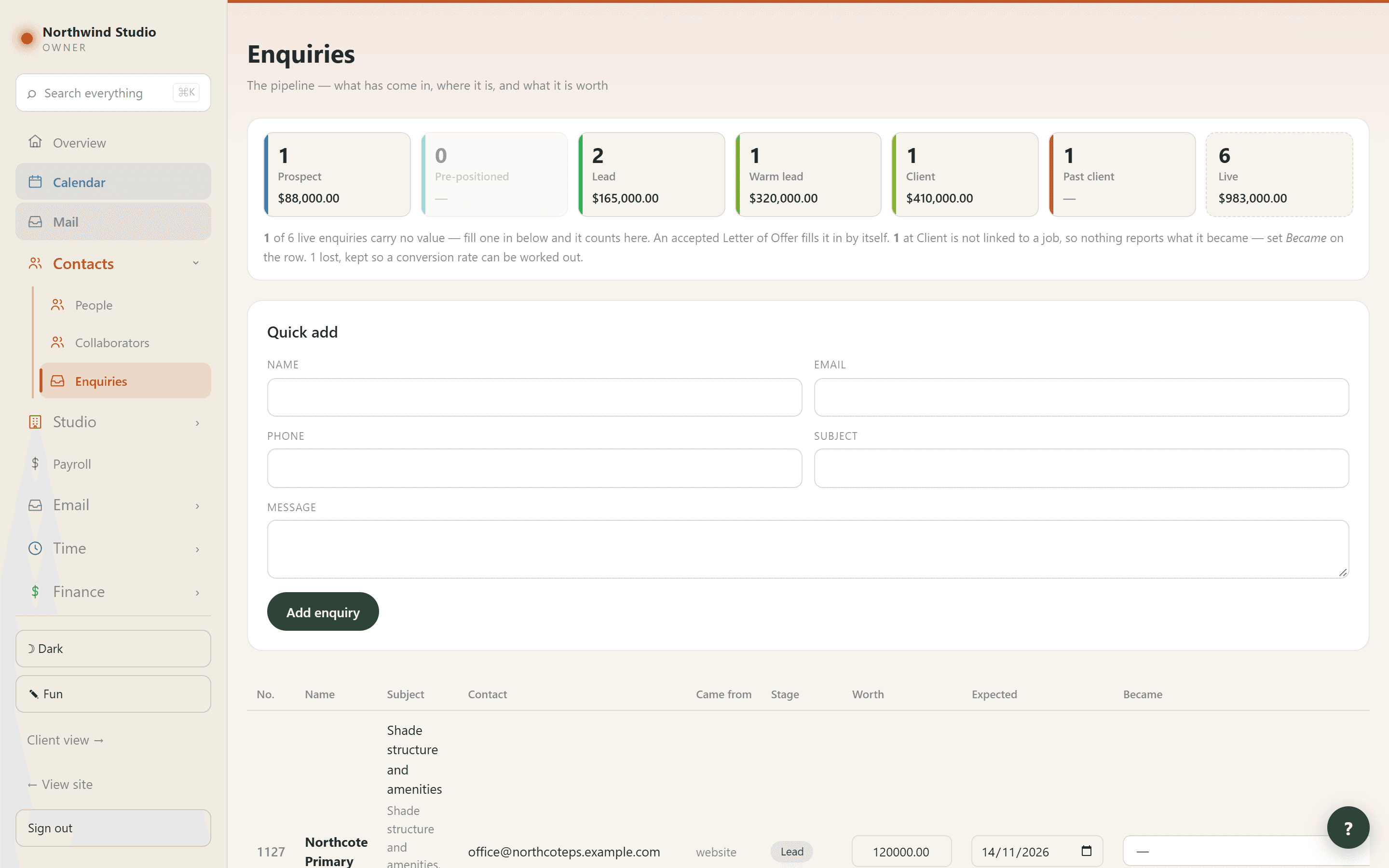
The pipeline belongs to the enquiry, not the person
Somebody can be a client on one job and a lead on another at the same moment. A single stage stored on the person cannot be true for both.
Prospect → Pre-positioned → Lead → Warm lead → Client → Past client
Or Lost. A person’s own position is worked out as the furthest-along of theirs, never typed.
Enquiries arrive by themselves
From booked consultations and from the inbox, carrying the words the person actually used. Each remembers what it came from, so re-running a sync cannot raise the same lead twice.
Became — the link that makes a conversion rate possible
Attaching an enquiry to the job it turned into. Without it the portal can count what came in but never what came of it.
Worth and expected, typed on the row
And an accepted offer replaces your estimate and goes read-only, so winning a job never shrinks the pipeline.
No weighted forecast, deliberately
Weighting an offer at 40% means nothing until there is enough of your own history to calibrate against. A percentage invented now would be a guess wearing a forecast’s clothes.
List or business cards
One answers what each person is to the practice; the other answers how do I reach them, with email and phone as live links.
Professionals, kept separate
Your accountant, bookkeeper, solicitor or broker — bought by the practice rather than by a job, which is the distinction the books already make.
Collaborators
Company and partner containers, each holding its own projects and its own admin hours to invoice.
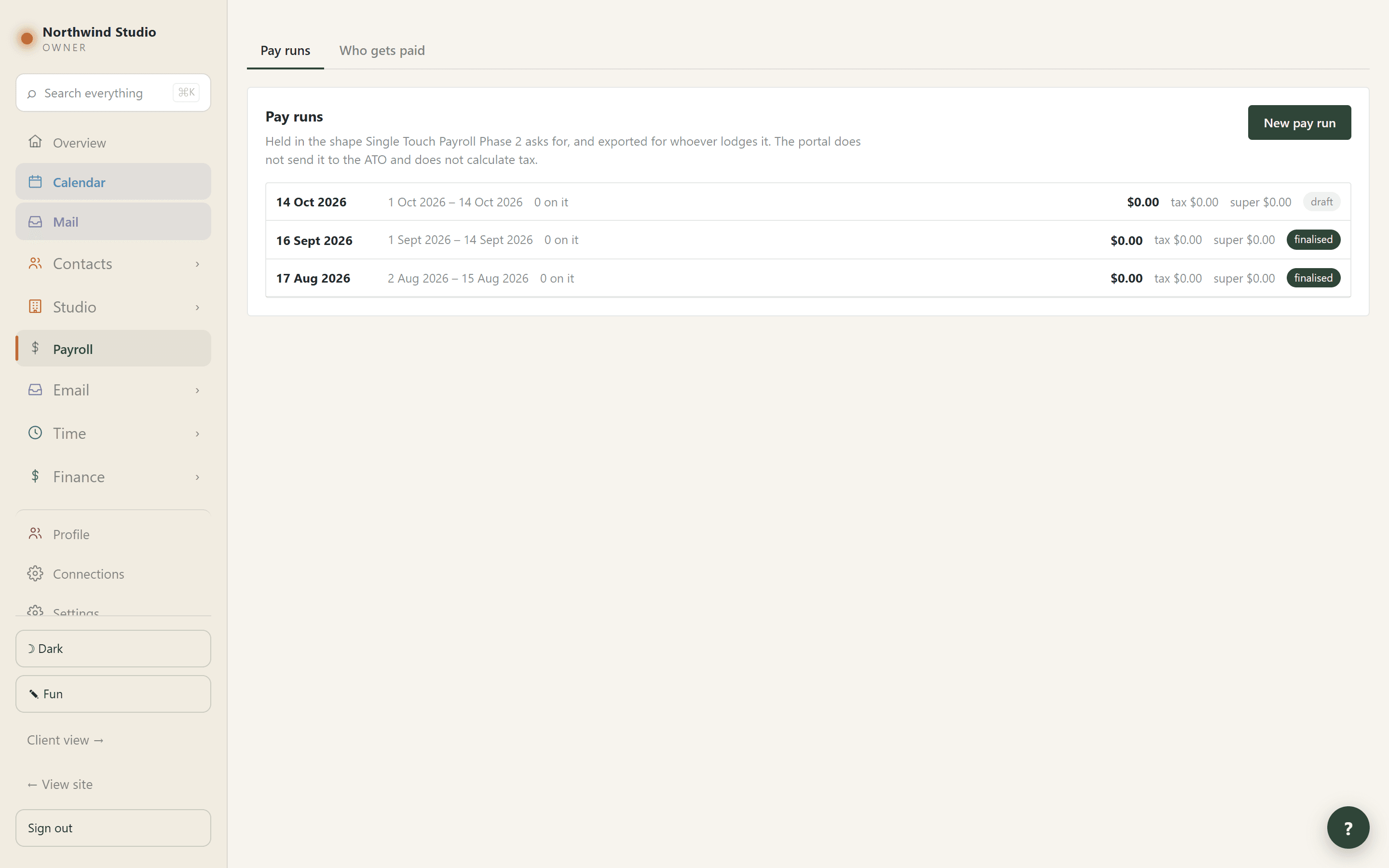
Paying them
Three ways, set on the person
Directors draw against money received, contractors claim against hours worked, employees go through payroll and leave as a Single Touch Export. Three different questions, answered three different ways.
A director’s fee, hourly or lump sum
Hours times pay rate, or the invoice less GST, less overheads, less what anyone else is owed. The two give different answers, so the basis is recorded with the draw.
A part payment unlocks part of the fee
A client pays 40% and 40% can be drawn; the rest unlocks when the balance arrives. It used to be all-or-nothing, so money in the bank could not be drawn on at all.
And the expense carries its working
“12.5 h at $88.00 · invoice 260033”, because months later that line is the only place the number is explained.
Unmarking an invoice paid reverses the fee
A fee is claimable against money actually received. It refuses outright if that fee has been paid or is in a pay run — money has moved, and that is a correction somebody makes deliberately.
A contractor claims a week at a time
Grouped Monday to Sunday with hours and value on each header, so a real backlog is one tick instead of fifty.
The claim is their OWN tax invoice
Their ABN, their GST position, their bank details, their numbering — not a request for the practice to pay them. An invoice over $82.50 without an ABN obliges the payer to withhold 47%.
Continuing their own series
TS-014 offers TS-015; INV0009 offers INV0010, padding kept. It is only ever a suggestion — it is their numbering and whatever they type wins.
Their letterhead, their logo, their payment terms
Set once on the profile rather than asked every fortnight, which is how one invoice ends up saying 30 days when the rest say 14.
Sent from their own address, if they want
Their own SMTP server, so the invoice genuinely leaves from them. The panel says which of the two will happen BEFORE they press send, and the confirmation says which did.
And it is never quietly re-sent through the practice
They set that server up precisely so the invoice would come from them.
Send a copy to anyone, without submitting it
To an accountant, say — with the statement of hours attached. The claim does not move, no expense appears, and the office is not told.
Their own contacts, nobody else can read
The people they send invoices to, kept on their profile and never on the practice’s People screen.
Anything that is not hours
Mileage, a licence, an agreed fixed price, something they paid for and are owed back — its own line, never grouped, and deliberately not on the statement of hours.
Submitting is what creates the payable
Not approving it — so the practice can see what it owes the moment a claim arrives. It used to only set a status, so a claim sat waiting to be noticed.
Sending one back removes the payable it raised
It used to stay behind, so resubmitting produced a second one and the same work could be paid twice.
Show the hours claimed
Every entry grouped by job, with the date, what was done, the hours, the rate and the amount — so a payment can be checked against the figure before it is approved.
Both sides keep their own record of being paid
And where they disagree, both screens say so: “office has not recorded it” on one, “Katie says paid — we have not recorded it” on the other.
Set aside the ones you will never bill
The per-entry version of drawing a line under the old ones — “not my office time, but yes those two days from the same week”.
An hour can never be claimed twice
A claim line points at the exact timesheet row and the database refuses a second claim on it, whatever the screen does.
A lump-sum fee settles the hours it bought
Otherwise a director could draw the residual AND claim the hours, and be paid twice for the same work.
Non-billable hours are claimable too
Office time, and hours on a job coded NB or PB, paid at the non-billable rate on the person’s record.
Single Touch Export
One press takes a pay run out in the Phase 2 shape the ATO asks for — gross taken apart the way it requires, with overtime, bonuses, directors’ fees, salary sacrifice, leave by reason, allowances, lump sums and deductions.
An export, not a lodgement — and it says so
The file is ready for whoever files it. We do not transmit to the ATO, which needs a Digital Service Provider registration, and we do not calculate the tax: both are published figures that change, and a plausible wrong one on a tax document is worse than a blank.
Anything that would stop a lodgement is shown above the figures
Not when you try to send it. A tax file number is write-only: the screen says whether one is held, never what it is.
Super due within seven business days
Shown on every run and written into the export.
A private split across your own accounts
Name a row, give it a percentage, and the last takes the balance. Super is treated properly — it sits on top of earnings rather than being taken out of them.
Your own tax deduction log
What you paid and the work-related share, both kept: a phone used 60% for work is a $1,000 receipt and a $600 deduction, and an auditor asks about the first.
A rough tax estimate, and what it admits it cannot know
Spouse details, trust distributions, foreign income, franking credits — listed, rather than quietly left out of a number somebody might rely on.
Tax rates as data, per year, with a note saying where they came from
Because a hard-coded rate quietly computes last year’s tax forever, and nothing in the portal can know when the published figures next change.
Does your tax reserve cover it?
What you have actually set aside this year beside what the year is estimated to owe — and it says why a shortfall is often not a mistake.
None of it visible through View-as
Claim your hours, Personal finances and Tax deductions are withheld even from an owner looking at a screen that is misbehaving. They are a person’s own money.
What each of them can see
Everyone’s permissions on one grid
A person’s record answers “what can Katie do”; the grid answers “who can see the bank” — which you could not get to otherwise without opening every record in turn.
Settings split six ways
So somebody can be given the one errand they need. A single tick used to mean letting somebody tidy the category list also handed over the practice’s ABN and bank account.
A permission shows the page AND opens its data
Typing the address does not get round it.
Professionals start with nothing
Not even the staff baseline. Each tick is a door, and the ones worth thinking about before handing to somebody outside the practice are marked WIDE rather than forbidden.
Clients get their own portal
Their projects, files with comments, checklist, milestones, hours and invoices — on their own routes, every one of which narrows to the signed-in person before it asks the database anything.
Consultants can be given one too
They see their jobs, the stages and programme, the files and the meeting room, and can upload what they have produced and comment on a drawing.
View as
See exactly somebody’s portal rather than a guess at it — which is the quickest way to check what you have just granted.
Support access is off until you turn it on
A day, three days, a week or a fortnight at most, and it ends by itself on the date shown. Only the owner can.
And everybody sees that it is on
A bar across every page for all staff, not just whoever switched it on — these are the office’s clients’ records, so the office gets to see that somebody outside can read them.
What support cannot do
Give anybody a login, a role or a permission — including themselves — or extend its own window. Nothing it does can outlast the access you set.
And the log outlives the access
“Has anyone been in?” is usually asked weeks later. Turning the switch off closes the door; it does not erase the record of it having been open.
Erase somebody’s personal data
And it shows you first what will go and what cannot: an issued invoice keeps the supplier’s name and ABN, because a tax invoice must carry them for five years.
It refuses while money is owed
Erasing somebody still owed removes the bank details needed to pay them.
The shape of your practice
Trade under more than one name
Each with its own colours, logo, website, numbering series and usual service — so a client deals with the name they hired, not the group.
A booking page per brand
One page dressed from the trading name’s own row: its name, logo, website and colours. A third brand is a row rather than a new file.
Free times read from your real diary
Your working hours minus the calendars you have connected minus bookings already made. An all-day entry does not block the day, because most are labels rather than commitments.
Buffers that are actually applied
A 90-minute consultation can keep half an hour clear either side while a free 30-minute chat runs back to back.
The person who booked can move it themselves
With a code emailed to the address they booked with, so a forwarded confirmation is useless to whoever it was forwarded to.
Cancel and Delete are opposite promises
Cancel emails them and withdraws their calendar invite; Delete tells nobody and is for a test or a duplicate. The menu says which is which, and names the person.
A paid booking cannot be deleted
There is an invoice pointing at it, and an invoice attached to nothing is the one state nobody can reconcile.
Nothing the browser sends decides a price
The amount charged is worked out here from the consultation type and the discount code as stored.
Demo mode
A window in which nothing leaves the building, for showing the real portal with real data without a click reaching anybody. It turns itself off, and says afterwards what was created.
A help assistant that cannot invent a screen
The ? button answers from a written guide kept current in the same change as the software, and is told to say it does not know rather than describe a page that is not there.
Its instructions are yours to edit
Every AI skill in the portal is written, versioned and editable in Settings. No deploy.
Fun mode
Handwriting on the headings, squiggles, tape on the post-its, and an Australian animal across the screen about one task in five. Numbers always stay in the normal typeface.
On a phone, a table becomes cards
Nothing dropped, nothing scrolling sideways. The five screens that stay grids are named, so they are not faults to report.
Announcements
A notice at the top of everybody’s Overview, with an end date — because the notices nobody takes down are why people stop reading them.
Your own database and your own storage
A query that tries to reach outside your schema fails rather than quietly returning somebody else’s row.
A list is a list. The way to find out whether it fits your practice is to put one of your own jobs in it — which starts with a conversation, not a sign-up wall.
Start a trial →